How to mark a flat or house as managed for someone else, record disbursements, and produce an owner's statement of accounts.
If you run a flat or house for someone else, mark it as managed, record the money you pass on to its owner, and give them a statement of accounts.
When you add a property:

For a property you already have, open its Finance tab and select the button beside Rent status. It reads Held personally until you change it. The How this property is held panel opens.


The Ownership part of the property's details has the same Change who owns it button. The Finance button then reads Managed for and the owner's name.
Select the Managed for button to open the How this property is held panel, then Change who owns it.
The Who owns this property? window, pictured above, opens with For someone else chosen. Change the name, email or phone and select Save. If you have added a company of your own, Managed by lets you record which one runs this property for the owner, or Me personally. It does not change any figures yet.
To stop managing the property, choose Me or One of my companies in the same window. We ask Stop managing it for the owner's name. Select Me (or One of my companies) to confirm, or Keep managing, then select Save. Disbursements you have already recorded stay as they are.
The rent is the owner's money, so we keep it out of your own income and tax.
On the property's Finance tab, As owner shows the property as its owner would see it. Its tax estimate assumes the highest rate, because we do not know theirs.
As manager shows your side: Fees earned, Held for owner, Rent collected, Paid to owner (disbursements) and a row for the owner. The tax card is greyed out. We do not work out or file tax for an owner.

Rent collected and Paid to owner (disbursements) are this year's totals: £11,600 in and £11,200 paid across. Held for owner is a different figure, a running balance of the owner's money since the opening balance date you set. It is the rent received, less the owner's costs, your fees and what you paid over, so it is not the difference between those two totals. The Finance page works the same way across all your properties. Its Owned property and Managed property switch keeps their money apart from yours. To add your fee to a cost, see Charging your management fee.
A disbursement is money you pass on to the owner.


The payment shows greyed in your transactions and is not added to your income, expenses or tax.
 📱 Mobile screenshot coming soon
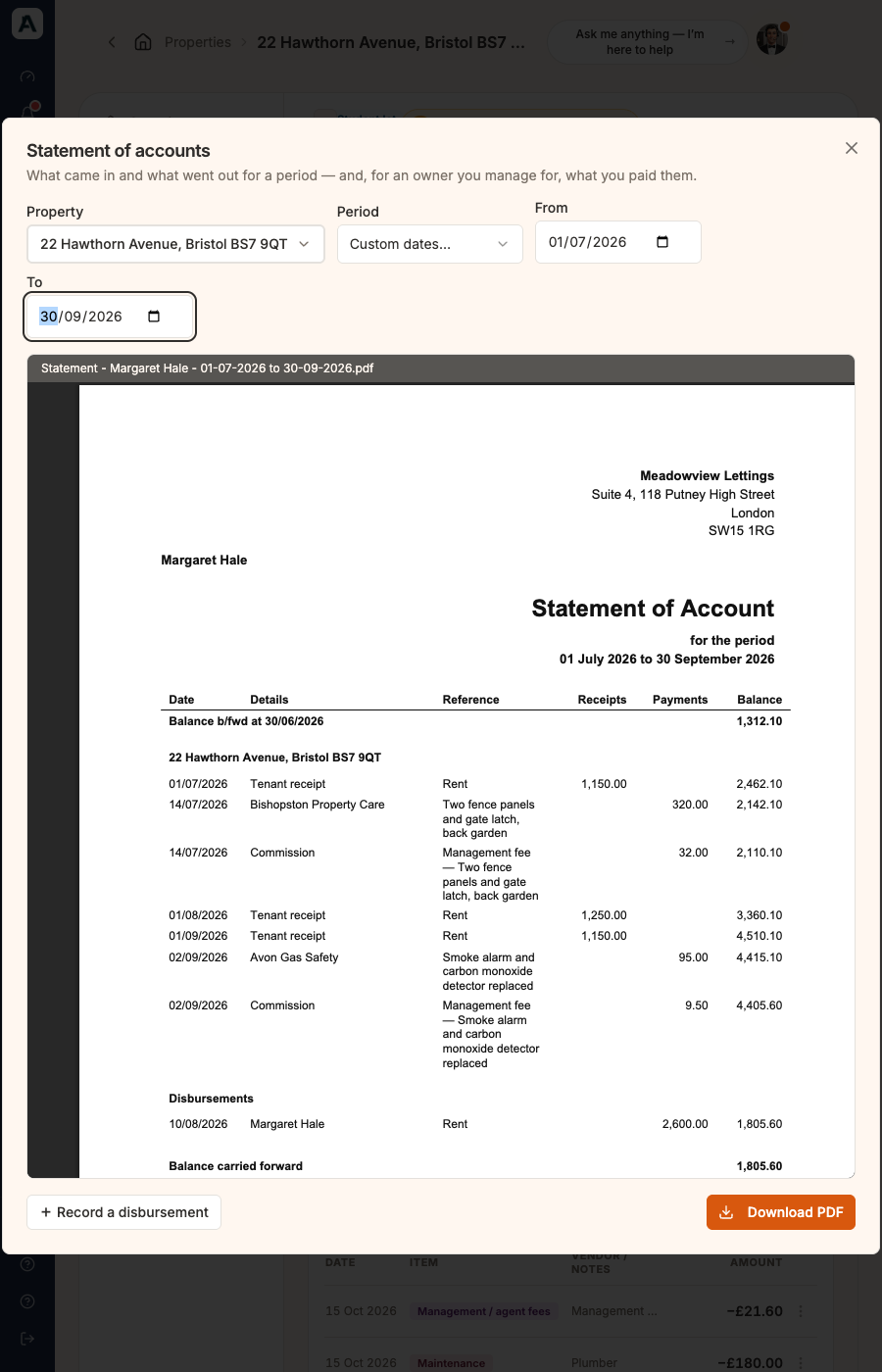
The statement shows the balance brought forward, then each property's money in and out by date. Your fees appear as Commission. A Disbursements section lists what you paid over, and the balance carried forward comes last. A deposit is the tenant's money, so it is left off. A minus sign on the balance means the owner owes you.
The first time, we ask how much of the owner's money you were holding the day before the statement starts. The question reads First statement for the owner's first name, and asks how much of their money you were holding on that date. Type the amount in the box beside it and select Save. Enter 0 if you held nothing.
We also ask for your Letterhead, your business name and address. Select Add letterhead to enter it. You can change it later under Settings, on the Profile tab.
Send the PDF to the owner yourself. We do not email statements.
